
Users Online
· Members Online: 0
· Total Members: 285
· Newest Member: Zarfdrilhor
Forum Threads
Latest Articles
Articles Hierarchy
Insert login form with password in excel
Insert login form with password in excel
Insert login form with password in excel Download
 BY
BY Even though Microsoft Excel doesn’t qualify as a high security data protection system, sometimes users of an workbook file must be sorted out and have different information access rights. The solution for this is to implement a login form in excel, like this one:

How to insert login form with password in excel
The first step is to create the form with all the fields, labels and buttons you need. Go to Developer tab -> Visual Basic
In the left panel you can right click the project, select Insert – UserForm and start building the form with the tools available in the Tool Box.
After this select the form and complete some of its attributes like the Name (let’s say frmPass), colors and all others that you need. Right click on the form and select View Code. Insert all the lines in the picture bellow:
Note that I have attached the excel file at the end of the article so that you don’t have to copy the code from the pictures, this is just for you to know the steps necessary.

The UserForm_QuerryClose procedure is needed in order for the form not to be closed from the X upper right button and the whole effort of building the login form be in vain.
Go to ThisWorkbook in the left side of the screen and add the code bellow:

This ensures that the form prepared for the log in is presented to the user when the excel file is opened. The Workbook_BeforeSave function ensures that when the file is saved, no information remains in the worksheet Report and the CA worksheet is hidden (very hidden – that is, it can’t be unhidden from excel but only from Visual Basic sheet attributes). These are all examples, you can choose to do whatever you need to, in order to protect all the worksheets and information.
Don’t forget to add a password to the whole project, in order for the users not to see the code behind. Right click on the project in Visual Basic and go to Protection tab:
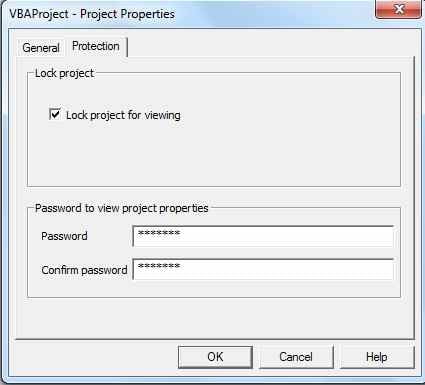
I have attached the source excel file for you, so that you don’t have to retype the code in the pictures. The VBA password is PA$$ and the login form user is guest with pa$$ (the code behind the form transforms all the letters into caps to keep it simple).
You can find a sheet named Usr that is veryhidden, where I put a list of users and passwords that can be amended for your needs. I must say that the form can be bypass with Ctr+Pause. For this you must treat the error for Ctr+Pause so that it will not bypass the form. This is a subject for another article.
Download – Insert Login Form with Password Example
Enjoy!
